
Weekly Blog 4 - I’m Back!
How a Typo Led Me to Discover a Privilege Escalation Vulnerability — and Why Wazuh Didn’t Catch It (At First)
What I Was Trying to Do
The goal was simple. I wanted a restricted test user on the Ubuntu server — one that couldn’t run sensitive commands like cat or vim on protected files. The idea was to simulate a scenario where a low-privilege attacker has SSH access but limited capability.
I went through the usual setup: created the user, adjusted permissions, restricted access to certain paths. Standard stuff. I thought I was done.
Then I switched to the test user and tried to read a public SSH config file just to verify things were locked down.
cat /etc/ssh/sshd_config
It worked. No permission error. That was unexpected — but okay, maybe that file has broader read permissions. I tried something more sensitive.
cat /etc/shadow
The shadow file stores hashed passwords for every user on the system. A normal low-privilege user should get:
cat: /etc/shadow: Permission denied
Instead, I got a full dump of every password hash on the machine. Every single one.
I sat there for a moment just staring at it.
Tracing It Back to the Typo
I went back through the commands I’d run during setup. And there it was:
chmod +s /usr/bin/cat
I had meant to remove the execution permission for that low previlege user. That +s was a typo. One character. And it had completely broken the security model for that binary.
For anyone unfamiliar: chmod +s sets the SUID bit (Set User ID) on a file. Normally when you execute a program, it runs with your permissions. With the SUID bit set, the program runs with the permissions of the file’s owner — in this case, root.
So when the low-privilege test user ran cat, it wasn’t running as that user. It was running as root. Which means it could read anything root can read. Including /etc/shadow.
A single mistyped character turned one of the most basic Unix utilities into a privilege escalation vector.
What SUID Actually Is
The SUID permission bit has a legitimate purpose. Some system programs genuinely need it. passwd is a classic example — when you change your own password, the process needs to write to /etc/shadow, which is owned by root. SUID on passwd makes that work without giving the user direct root access.
The problem is when SUID ends up on binaries that were never meant to have it. Utilities like cat, vim, find, python, bash, tar — these are general-purpose tools. With SUID set, they become root-level execution primitives.
There’s a project called GTFOBins that catalogs exactly this. It documents how common Unix binaries can be abused when given elevated permissions. cat with SUID is entry one. The attack is exactly what I accidentally did: read any file on the system regardless of who owns it.
# Verify the SUID bit is set
ls -la /usr/bin/cat
# -rwsr-xr-x 1 root root ... /usr/bin/cat
# The 's' in place of 'x' in the owner field — that's the SUID bit
This vulnerability is tracked in MITRE ATT&CK as T1548.001 — Abuse Elevation Control Mechanism: Setuid and Setgid.
Should Wazuh Have Caught This?
This is the question I asked myself next. I had Wazuh running. I’d already set up active response for brute force. Surely reading /etc/shadow via a SUID binary should have triggered something?
I went into the Wazuh dashboard and searched the alerts. Nothing. No alert for the /etc/shadow read. No alert for SUID execution.
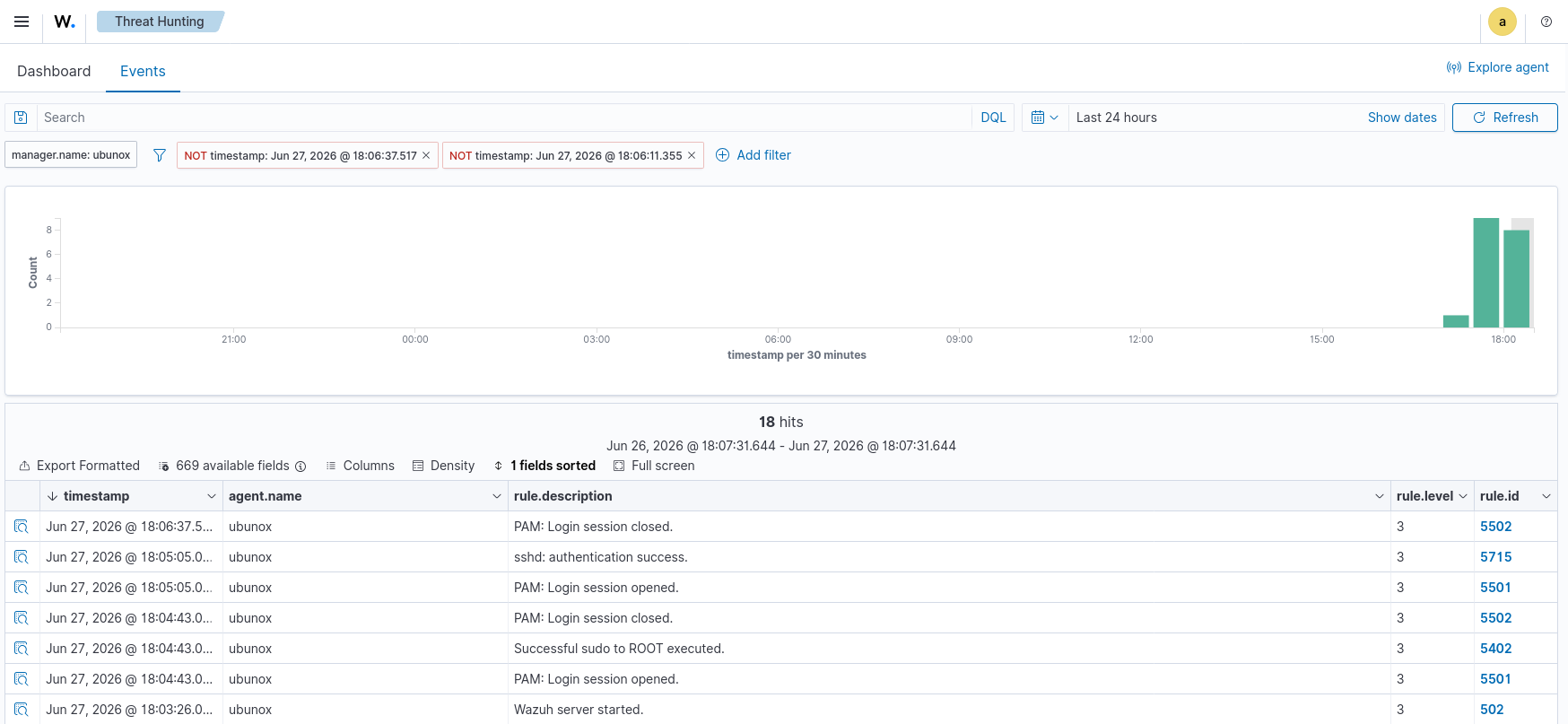
My first instinct was that I’d misconfigured something. But after digging into it I realised the issue was more fundamental: Wazuh can only detect what it has logs for.
Wazuh is a SIEM. It aggregates, parses, and correlates log data. But in this case, there were no logs being generated for file reads at the kernel level. The Linux system wasn’t recording the fact that /etc/shadow had been read. So Wazuh had nothing to work with.
This is a critical concept that gets glossed over in a lot of beginner SIEM content: a SIEM is only as good as its log sources. If the underlying system isn’t generating the right telemetry, no amount of Wazuh configuration will help you.
To detect filesystem-level activity — file reads, writes, process executions — you need the Linux kernel’s own audit subsystem: auditd.
auditd
auditd is the Linux Audit Daemon. It sits at the kernel level and can log almost any system call: file access, process execution, privilege changes, network connections. It’s the foundation of host-based detection on Linux.
Wazuh has native support for auditd logs. Once auditd is configured to watch specific files or syscalls, it writes to /var/log/audit/audit.log, and Wazuh’s agent picks that up, parses it, and can trigger rules against it.
The setup flow is:
Attack → Linux Kernel Syscall → auditd logs it → Wazuh agent reads log → Wazuh rule matches → Alert fires
Without auditd, that chain breaks at step two. The attack happens, but nothing records it.
To watch /etc/shadow for any read or write access:
auditctl -w /etc/shadow -p rw -k shadow_access
Breaking that down:
-w /etc/shadow— watch this file-p rw— trigger on read (r) or write (w)-k shadow_access— tag matching events with this key for easy searching
Now when cat /etc/shadow runs — SUID or otherwise — auditd generates a log entry. Wazuh picks it up. And with the right rule, an alert fires.
Writing the Wazuh Detection Rule
Wazuh ships with some default auditd rules, but nothing specific enough for this case. Writing a custom rule is the right move — it’s also what Detection Engineers actually do professionally.
A Wazuh rule for this looks like:
<rule id="100200" level="12">
  <if_sid>80700</if_sid>
  <field name="audit.key">shadow_access</field>
  <description>Sensitive file /etc/shadow was accessed</description>
  <mitre>
    <id>T1548.001</id>
  </mitre>
  <group>audit,privilege_escalation,suid_abuse</group>
</rule>
Breaking it down:
id="100200"— custom rules start at 100000level="12"— high severity (Wazuh scale is 0–15)if_sid>80700— parent rule for auditd eventsaudit.keyfield matches the key we set in auditctlmitretag maps directly to ATT&CK T1548.001
This is the part that matters for a Detection Engineering portfolio: not just “Wazuh alerted on something,” but “I identified a gap in detection coverage, configured the right log source, and wrote a rule that maps to a specific ATT&CK technique with appropriate severity.”
Reproducing the Attack with Detection Active
With auditd and the custom Wazuh rule in place, I reproduced the attack:
# SSH in as low-priv user
ssh testuser@192.168.56.101

# Attempt to read shadow file via SUID cat
cat /etc/shadow
This time, the Wazuh dashboard showed an alert within seconds. Severity 12. Mapped to T1548.001.
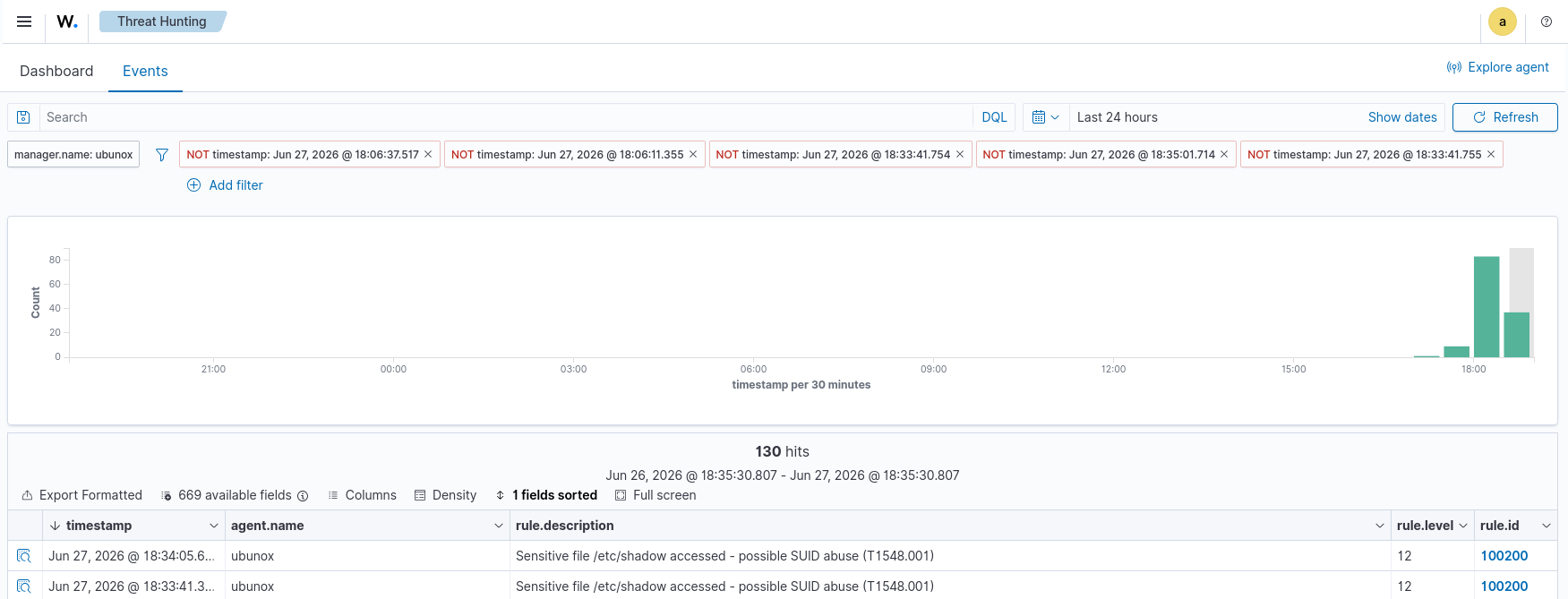
The alert contained:
- The exact file accessed (
/etc/shadow) - The process that accessed it (
cat) - The UID of the user who ran it (the low-priv test user)
- The effective UID at execution time (0 — root, because of SUID)
- The timestamp
That last detail is the key forensic signal: UID ≠ EUID. A normal user running a normal binary will have matching UID and EUID. When SUID is in play, the EUID is elevated. auditd captures both. That discrepancy alone is detectable without even needing to watch specific files.
Cleanup and Hardening
After confirming detection, I removed the SUID bit:
chmod -s /usr/bin/cat
# Verify
ls -la /usr/bin/cat
# -rwxr-xr-x — 's' is gone
Beyond fixing the specific misconfiguration, the right mitigation approach is:
Audit all SUID/SGID binaries regularly:
find / -perm -4000 -type f 2>/dev/null
Any binary in that list that shouldn’t be there is a potential escalation path. Cross-reference against GTFOBins.
Make the auditctl rule persistent so it survives reboots — add it to /etc/audit/rules.d/ as a .rules file.
Add a broader Wazuh rule for SUID execution — not just shadow access, but any case where UID ≠ EUID during execution. That catches SUID abuse on any binary, not just cat.
What This Taught Me About Detection Engineering
A few things stood out from working through this:
1. SIEMs don’t detect — they correlate. Wazuh didn’t fail. It was doing exactly what a SIEM does. I failed to give it the right data. In a real SOC environment, understanding your log coverage gaps is one of the most important things a Detection Engineer can do.
2. The best vulnerabilities are accidental. In real incident investigations, a lot of privilege escalation cases trace back to a misconfiguration made years ago by someone who didn’t know what they were doing. A typo in a chmod command. A package installer that set SUID “for convenience.” The attacker didn’t need to be sophisticated — they just needed to check.
3. Custom rules require understanding the data. Writing the Wazuh rule meant understanding what auditd actually logs, what fields are available, and what distinguishes a malicious read from a routine one. That’s not something you get from copying rule templates — it comes from digging into raw log output and working backward.
4. The MITRE ATT&CK framework is more useful than it looks. Mapping to T1548.001 isn’t just a label for the resume. It situates this technique within a broader kill chain. SUID abuse typically follows initial access and precedes lateral movement or data access. Knowing the context makes you better at anticipating what comes next.
What’s Next
This lab is one stage of a larger attack chain I’m building out in this environment:
- Initial Access — SSH Brute Force (T1110.001) with Wazuh Active Response
- Privilege Escalation — SUID Abuse (T1548.001) with auditd + custom Wazuh rule
- Persistence — Cron job backdoor (T1053.003)
- Exfiltration — Netcat file transfer (T1048)
Each stage gets its own custom Wazuh detection rule, ATT&CK mapping, and writeup. The goal is a complete documented attack chain with full detection coverage — the kind of lab work that reflects what Detection Engineering actually looks like day to day.
That’s it for this week!! See you all next week!
PS: Couldn’t practise for cybersecurity due to semester exams, nontheless will be consistent from now!!
Comments — via Reddit · Join the discussion ↗
Loading comments…